
Close a Cashier Period, Prepare a Deposit, and Reconcile It
Financial Operations moves revenue from collection through cashier closeout, deposit preparation, and reconciliation. These are separate stages with different review requirements.
Before you beginOpen Administration → Financial Operations. Confirm the collection period, actual receipts, counted funds, and agency review policy.
Step-by-step instructions
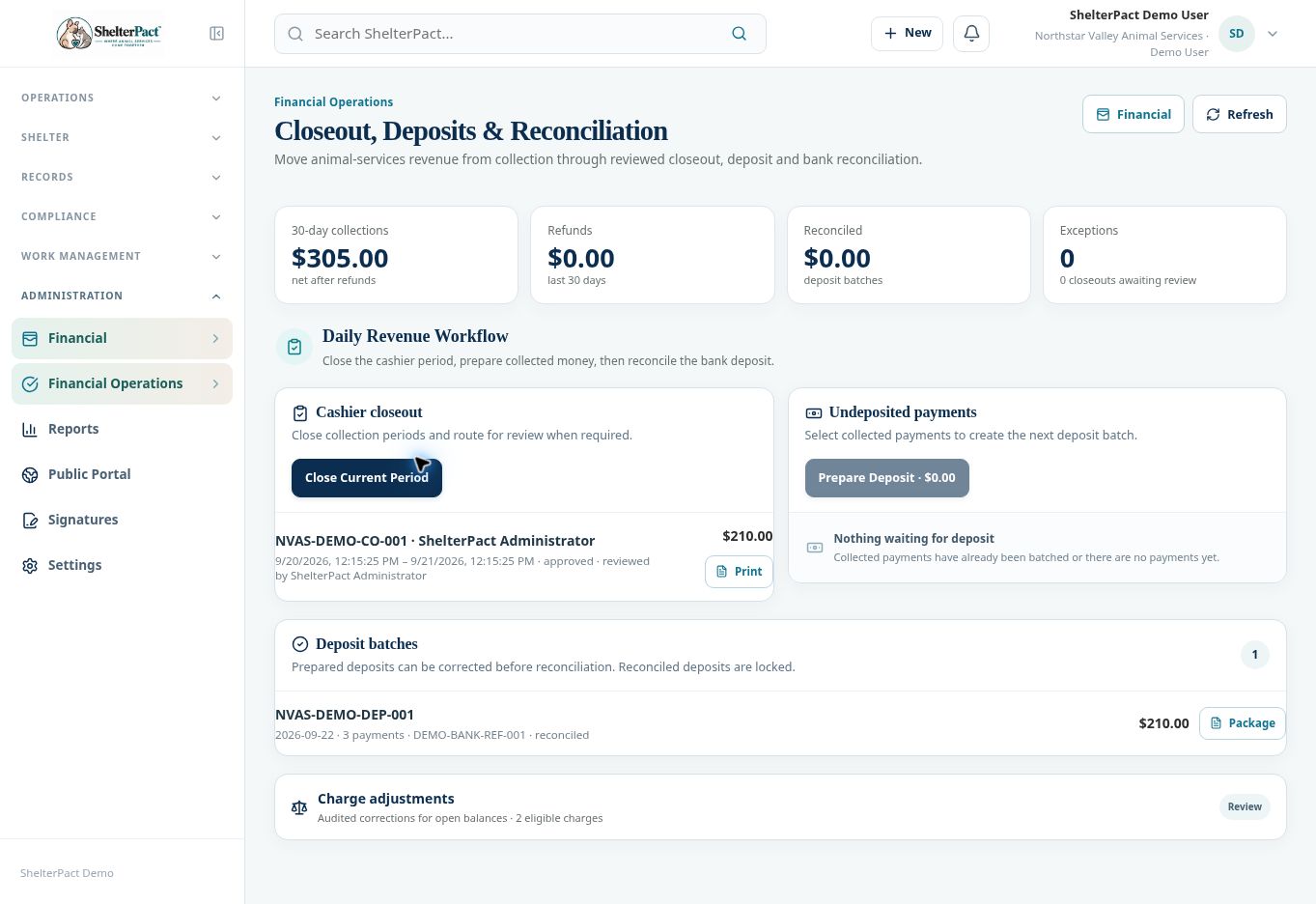
- Review the collections summary and any Exceptions, including closeouts awaiting review.
- Use Close Current Period when the cashier’s collection period is ready. Follow the displayed prompts and verify the period and details before saving.
- When review is required, have an authorized reviewer inspect the closeout and record the appropriate approval decision. Review the saved closeout status and printout.
- Review Undeposited payments. Select only payments included in the next actual deposit and verify their methods and amounts.
- Use Prepare Deposit and complete the displayed batch information. Review the batch date, payment count, amount, and reference.
- Inspect and correct a prepared batch before reconciliation when necessary and authorized.
- Reconcile the batch to the actual bank deposit using the available reconciliation controls. Confirm amount, date, and reference before finalizing.
- Review the reconciled status and Package documentation. Reconciled deposits are locked; preserve the audit trail for subsequent corrections.
Screenshots
Practical checks
The inspected demo has an approved closeout and a reconciled batch; it does not show a pending batch available for new reconciliation. Use the live displayed controls for your organization’s current state.
Troubleshooting
| What you see | What to check |
|---|---|
| No payments are waiting for deposit | Check whether the payments have already been batched and whether the collection was recorded. |
| A closeout requires review | Have a permissioned reviewer complete that step rather than assuming closure equals approval. |
| The actual deposit differs from the batch | Resolve the discrepancy before reconciliation and retain an explanation. |