
Create a Permanent Animal Record
New Animal Record creates the identity that other ShelterPact workflows reuse. Use Intake instead when your primary event is an animal entering custody.
Before you beginComplete an identity search first. Gather observed descriptors and any identifiers; do not invent unknown information.
Step-by-step instructions
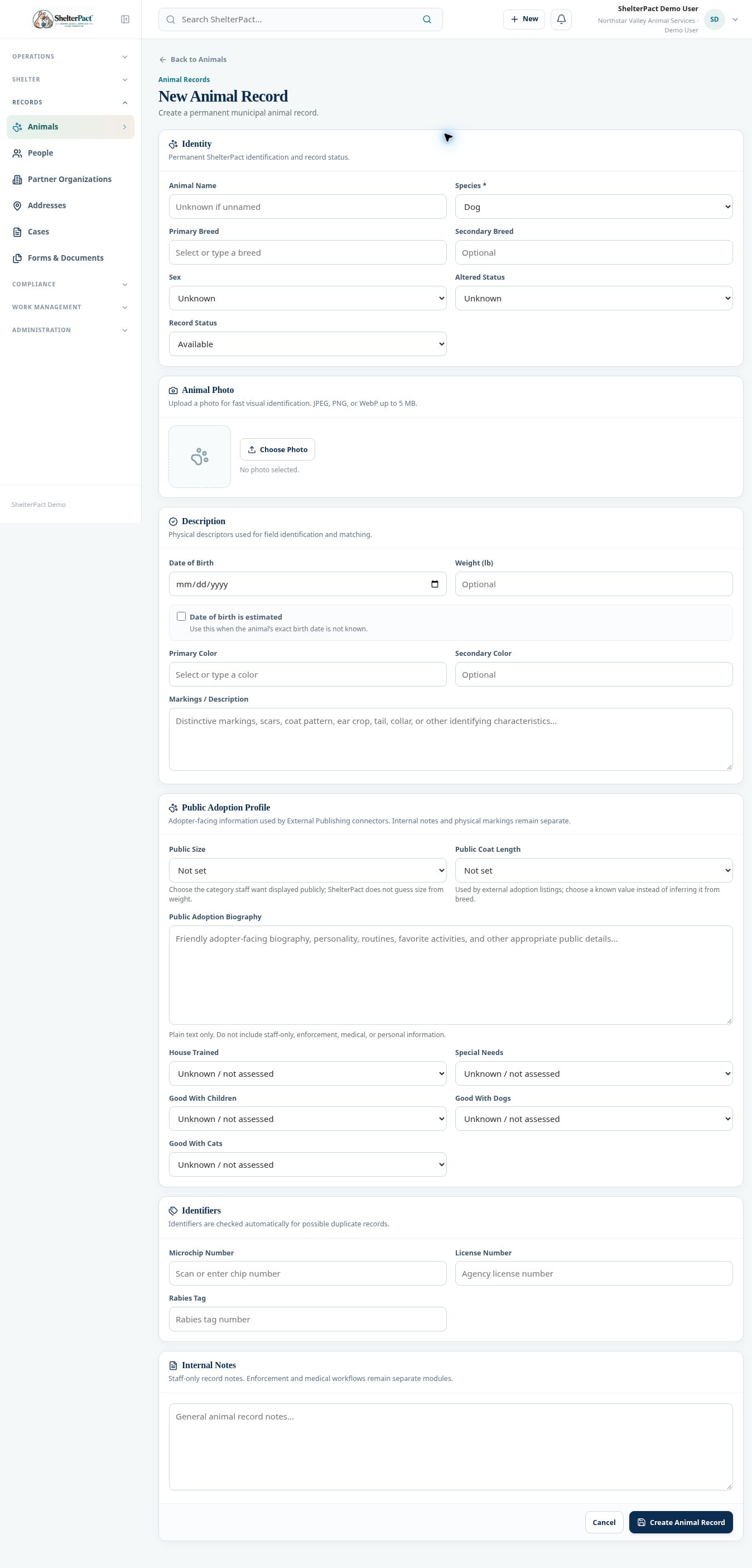
- Open Records → Animals → New Animal, or New → Add Animal. Enter Animal Name if known; unnamed animals can be recorded as Unknown.
- Select Species, Primary Breed, and optional Secondary Breed. Record Sex and Altered Status as known, using Unknown where they have not been verified.
- Choose Record Status intentionally. Review the default rather than accepting Available for an animal that has not yet been evaluated.
- Enter Date of Birth and mark it estimated when appropriate. Record Weight in pounds, colors, and distinguishing markings.
- Use Choose Photo for a clear identification image. The displayed limits allow JPEG, PNG, or WebP up to 5 MB.
- Enter Microchip Number, License Number, and Rabies Tag accurately. Review any possible duplicate records flagged by identifiers.
- Keep staff-only notes in Internal Notes. Enter adopter-facing information only in Public Adoption Profile when appropriate.
- Select Create Animal Record. Reopen or review the saved record, verify the assigned animal number and descriptors, then begin any required custody or care workflow.
Fields and meanings
| Field / control | What to review |
|---|---|
| Species | Required identity classification. |
| Estimated birth date | Identify an estimate rather than presenting it as exact. |
| Weight | The form records pounds; the public size category is selected separately. |
| Photo | JPEG, PNG, or WebP; up to 5 MB in the inspected form. |
| Identifiers | Enter numbers exactly; they are checked for possible duplicates. |
Screenshots
Practical checks
An identity record can exist without active custody. Confirm the animal is admitted through Intake when that is the event.
Troubleshooting
| What you see | What to check |
|---|---|
| The animal is saved but not in Current Population | Review whether an intake/custody episode was created. |
| An unknown breed or sex is later confirmed | Update the existing record rather than creating a replacement identity. |